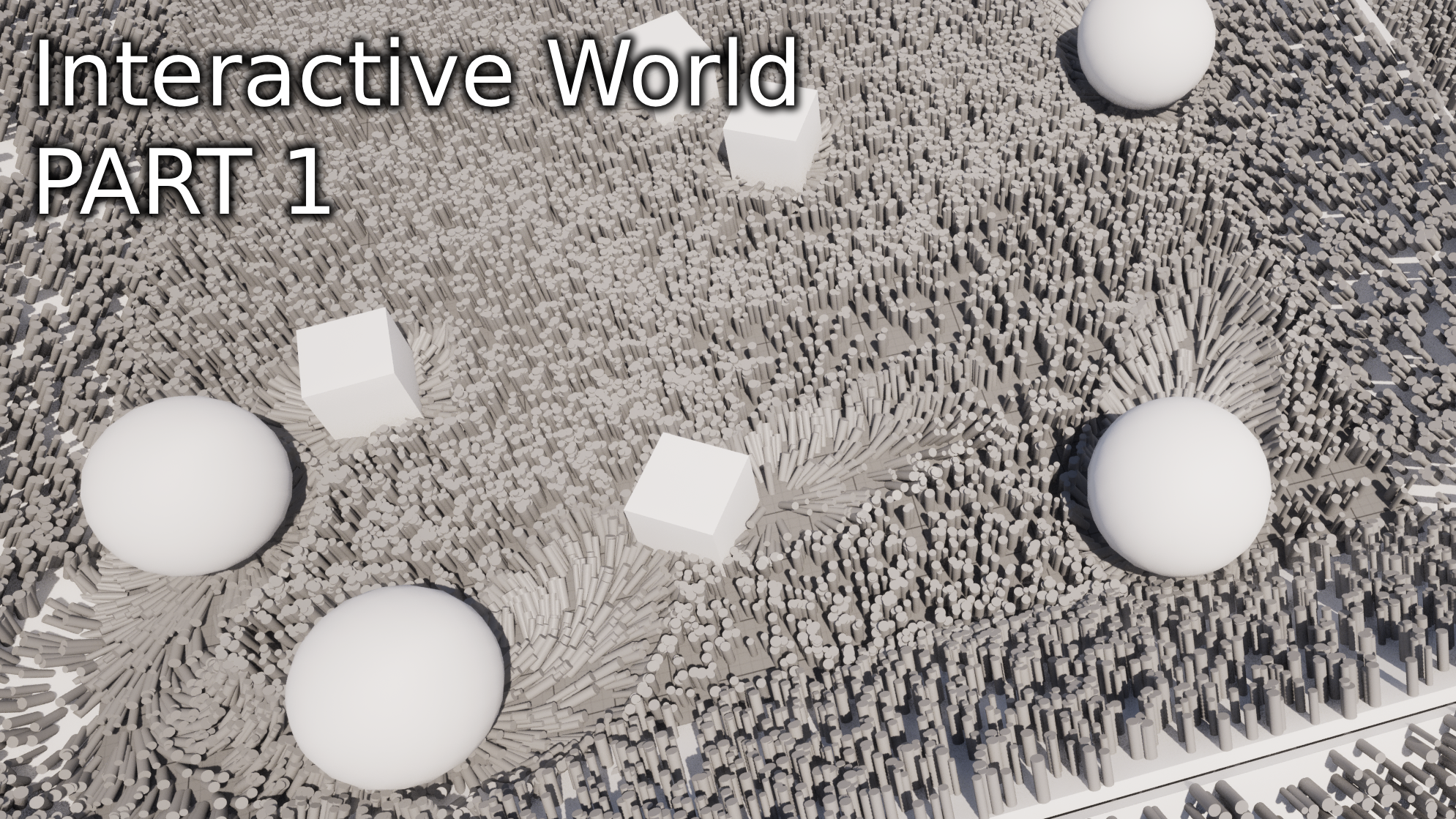
This project began during the summer as a personal initiative, and it has since evolved into an advanced, functional system. I’m currently documenting the development process here to showcase both the technical design and implementation details.
The core idea behind this plugin is to provide a dynamic system for creating wind sources in a 2D space, which can be integrated into materials and particle systems. The goal is to make virtual environments feel more alive and interactive by simulating wind effects that respond to in-world elements.
To support this functionality, I designed a modular system based on Unreal Engine’s component architecture:
- UWorldInteractionSubsystem
Acts as the brain of the system. This is a customWorldSubsystemresponsible for managing the behavior and communication between all wind-related components. It is initialized when the world is spawned and persists throughout the world’s lifecycle. - UPowerInteractionWindListener
Inherits fromSceneCaptureComponent2D. This component is responsible for rendering wind sources to a render target. It is designed to capture only wind-emitting components, ignoring all other scene elements for optimal performance. - UWindMeshEmitter
Inherits fromStaticMeshComponent. This component serves as a physical representation of a wind source in the world. - UWindNiagaraEmitter
Inherits fromNiagaraComponent. This emitter leverages Niagara for more advanced, particle-based wind effects.
This are the base classes for the project to work. The objective is:
- Instantiate the
UWorldInteractionSubsystemautomatically when the world is created. - Register each
UPowerInteractionWindListenerinstance with the subsystem upon creation. - Configure the listener to exclusively render registered wind sources for performance efficiency.
- Automatically register all
UWindMeshEmitterandUWindNiagaraEmittercomponents to the subsystem, and dynamically add them to the listener’sShowOnlyComponentslist.
This is the main step of the plugin development, once this is working, I can keep going with the fun stuff.
The UWorldInteractionSubsystem header will look as this at this moment:
UCLASS()
class POWERWORLDINTERACTION_API UWorldInteractionSubsystem : public UTickableWorldSubsystem
{
	GENERATED_BODY()

public:

	void RegisterWindListener(class UPowerInteractionWindListener* Listener);
	void UnRegisterWindListener(class UPowerInteractionWindListener* Listener);
	void RegisterWindSource(class UPrimitiveComponent* WindSource);
	void UnRegisterWindSource(class UPrimitiveComponent* WindSource);

	UPowerInteractionWindListener* GetActiveWindListener() const;

protected:

	//Soft ref to the active wind listener, there should be only one at a time
	TSoftObjectPtr<class UPowerInteractionWindListener> ActiveWindListener;
	//Currently active wind sources in the world
	TArray<TWeakObjectPtr<class UPrimitiveComponent> > ActiveWindSources;

    //This method updates the wind sources on the active listener
    void UpdateListenerWindSources();

}
I got methods to register/unregister wind listeners and sources. I store the components using weak pointers so I don’t block them from being deleted, so the system works with level streaming.
This is the implementation:
DEFINE_LOG_CATEGORY_STATIC(LogUWorldInteractionSubsystem, Log, All);

void UWorldInteractionSubsystem::RegisterWindListener(UPowerInteractionWindListener* Listener)
{
	if (ActiveWindListener.IsValid())
	{
		UE_LOG(LogUWorldInteractionSubsystem, Warning, TEXT("Registered new wind listener: %s \n Removed old listener: %s \n only 1 listener can be active at the same time"), *ActiveWindListener->GetName(), *Listener->GetName());
	}

	if(ActiveWindListener != Listener && Listener)
	{
		ActiveWindListener = Listener;

		//Empty the previous components and add the new ones on the listener
		UpdateListenerWindSources();
	}

}

void UWorldInteractionSubsystem::UnRegisterWindListener(UPowerInteractionWindListener* Listener)
{
	if (ActiveWindListener == Listener)
	{
		ActiveWindListener = nullptr;
	}
	else
	{
		UE_LOG(LogUWorldInteractionSubsystem, Warning, TEXT("Trying to unregister a wind listener that is not registered: %s"), *Listener->GetName());
	}
}

void UWorldInteractionSubsystem::UnRegisterWindSource(UPrimitiveComponent* WindSource)
{
	ActiveWindSources.Remove(WindSource);
	UpdateListenerWindSources();
}

void UWorldInteractionSubsystem::RegisterWindSource(UPrimitiveComponent* WindSource)
{
	ActiveWindSources.AddUnique(WindSource);
	UpdateListenerWindSources();
}

UPowerInteractionWindListener* UWorldInteractionSubsystem::GetActiveWindListener() const
{
	 return ActiveWindListener.Get();
}

void UWorldInteractionSubsystem::UpdateListenerWindSources()
{

	//Empty the previous components and add the new ones on the listener
	if(ActiveWindListener.IsValid())
	{
		ActiveWindListener->ShowOnlyComponents.Empty();
		ActiveWindListener->ShowOnlyComponents.Append(ActiveWindSources);
	}

}
On the wind emitter sources (Meshes and particles) i got something similar to this:
UCLASS(ClassGroup = (Custom), meta = (BlueprintSpawnableComponent))
class POWERWORLDINTERACTION_API UWindMeshEmitter : public UStaticMeshComponent
{
	GENERATED_BODY()

public:

	UWindMeshEmitter();

	virtual void OnRegister() override;
	virtual void OnUnregister() override;
}
This is the body:
DEFINE_LOG_CATEGORY_STATIC(LogWindMeshEmitter, Log, All);

UWindMeshEmitter::UWindMeshEmitter()
{
	SetHiddenInGame(true);
	SetVisibleInSceneCaptureOnly(true);

}

void UWindMeshEmitter::OnRegister()
{
	Super::OnRegister();

	UWorld* world = GetWorld();

	//Register this wind emitter in the world interaction subsystem
	UWorldInteractionSubsystem* Subsystem = world->GetSubsystem<UWorldInteractionSubsystem>();

	if(Subsystem)
	{
		Subsystem->RegisterWindSource(this);
	}
	else {
		if (world->WorldType == EWorldType::PIE || world->WorldType == EWorldType::Game)
		{
			UE_LOG(LogWindMeshEmitter, Warning, TEXT("No World Interaction Subsystem found in the world, make sure to add the WorldInteraction plugin to your project"));
		}
	}

}

void UWindMeshEmitter::OnUnregister()
{

	UWorld* world = GetWorld();

	//Unregister this wind emitter from the world interaction subsystem
	UWorldInteractionSubsystem* Subsystem = world->GetSubsystem<UWorldInteractionSubsystem>();

	if (Subsystem)
	{
		Subsystem->UnRegisterWindSource(this);
	}
	else {
		if (world->WorldType == EWorldType::PIE || world->WorldType == EWorldType::Game)
		{
			UE_LOG(LogWindMeshEmitter, Warning, TEXT("No World Interaction Subsystem found in the world, make sure to add the WorldInteraction plugin to your project"));
		}
	}

	Super::OnUnregister();

}
Although the UPowerInteractionWindListener shares behavior with the wind source components, its role is distinct. Rather than registering as a wind source, it uses dedicated methods to interface with the subsystem:
RegisterWindListener()UnregisterWindListener()
These allow the UWorldInteractionSubsystem to handle it separately from emitters, ensuring clear responsibility and efficient communication.
With the core system in place, it’s time to begin testing in-engine. For this phase, I’m using the Third Person Template provided by Unreal Engine as a base, though the system is designed to be project-agnostic and can be integrated into any setup.
To visualize the output of the UPowerInteractionWindListener, I created a Render Target asset inside the content folder of the project. This Render Target will be used by the listener to output the visual representation of active wind sources:

After that I added a WindListenerComponent to the pawn:

This is the configuration set for the listener on the details panel (In the future these settings should be set on the class constructor, for ease of use):

The texture target set is the render target created.
Also on the show flags I untick everything except these 5:
- ParticleSprites
- SkeletalMeshes (Not needed by now, but maybe later I will need this)
- StaticMeshes
- Translucency
- Game
By doing this, I disable all render features that I don’t need. (Presumably improving performance)
Now I created 1 actor with a StaticMesh and a UWindMeshEmitter:

To visualize wind direction and intensity from the SceneCapture, I created an unlit material that outputs the surface normals.
Since the UPowerInteractionWindListener captures only wind-related components and does not render scene lighting, all materials used in this context must be unlit. This ensures that the visuals are consistent and independent of the scene’s lighting setup.
Additionally, using unlit materials offers a performance benefit they are less expensive to render, making them ideal for real-time systems like this one.
Now we drag some of these blueprints to our scene:

Now we hit play and see the results:

I developed a widget that displays the render target in real time, allowing me to verify that all draw operations are working correctly.
That’s everything by now.
In the next update, I’ll cover how to pack and unpack normals within the render target, set up a background component, and demonstrate how to use this information in a material.
Deja un comentario